Chrome Extension
See through the fake.
Verigin automatically scans images, videos, and articles as you browse — and shows you exactly how much you can trust them. No uploads. No extra tabs. Just the truth, right where you're looking.
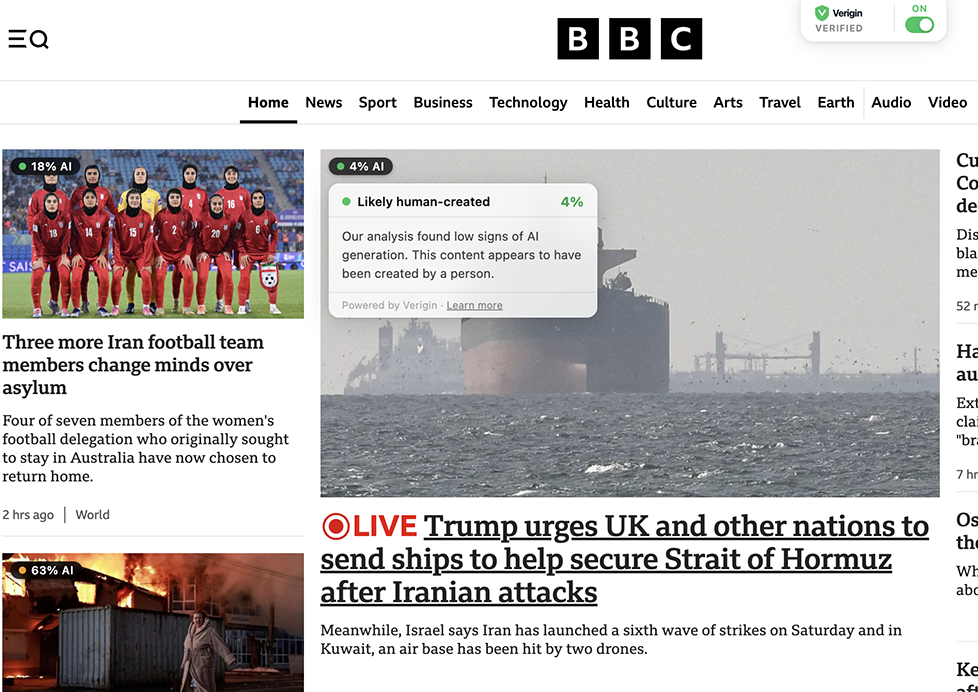
Verigin automatically scans images, videos, and articles as you browse — and shows you exactly how much you can trust them. No uploads. No extra tabs. Just the truth, right where you're looking.
Studies show people correctly identify AI-generated images only about 50% of the time — barely better than a coin flip. Verigin tips the odds back in your favor, automatically, on every page you visit.
Three steps and you're done.
Add Verigin from the Chrome Web Store. No account required to get started.
Verigin runs silently in the background. Every image, video, and article is scanned as it enters your viewport.
Color-coded badges appear inline — green, yellow, or red. Tap any badge for a plain-English explanation of what was detected and why.
Every badge tells you what it found and how confident it is. Click for the full breakdown.
Verigin doesn't ask you to leave the page. Badges appear inline, right on the content.
Detects both fully AI-generated images and real photos that have been AI-manipulated — including face swaps and generative fill edits.
Scores full articles and social posts. Tells you how many sentences were flagged, and gives a confidence percentage you can act on.
Samples video frames automatically to detect AI-generated footage. Works on embedded videos and X/Twitter media.
No credit card required to get started.
Cancel anytime. No questions asked.
Anyone who reads the news and cares about what's real.
"I share a lot. I can't afford to be wrong."
Catch AI-generated images and synthetic content before you repost or cite them. Stop being the person who spread the deepfake.
"My students believe everything they see."
Teach media literacy with real-time examples as you browse together. Make the invisible visible for a new generation.
"My credibility depends on getting it right."
Pre-screen every image and article during the research phase. A persistent co-pilot that catches what your eye misses.
Verigin sends content to our scoring engine only when it enters your viewport. We don't log what sites you visit, what you read, or who you are. Pro subscribers get their own check history stored only in their account — nothing is ever sold or shared.
Install Verigin free and start seeing the internet more clearly.
Add to Chrome — It's Free →